

From AAF to mix-ready.
Now inside Pro Tools.
Drop an AAF or open a session from the Extensions panel: every clip classified and matched to your template. Included in every fPost plan.
- Pro Tools 2026.11+macOS 13.5+
- Free to start
Prefer the desktop app? fPost
Import. Organize. Split.
Step 1 · Import the AAF
One AAF or a whole turnover, in one pass.
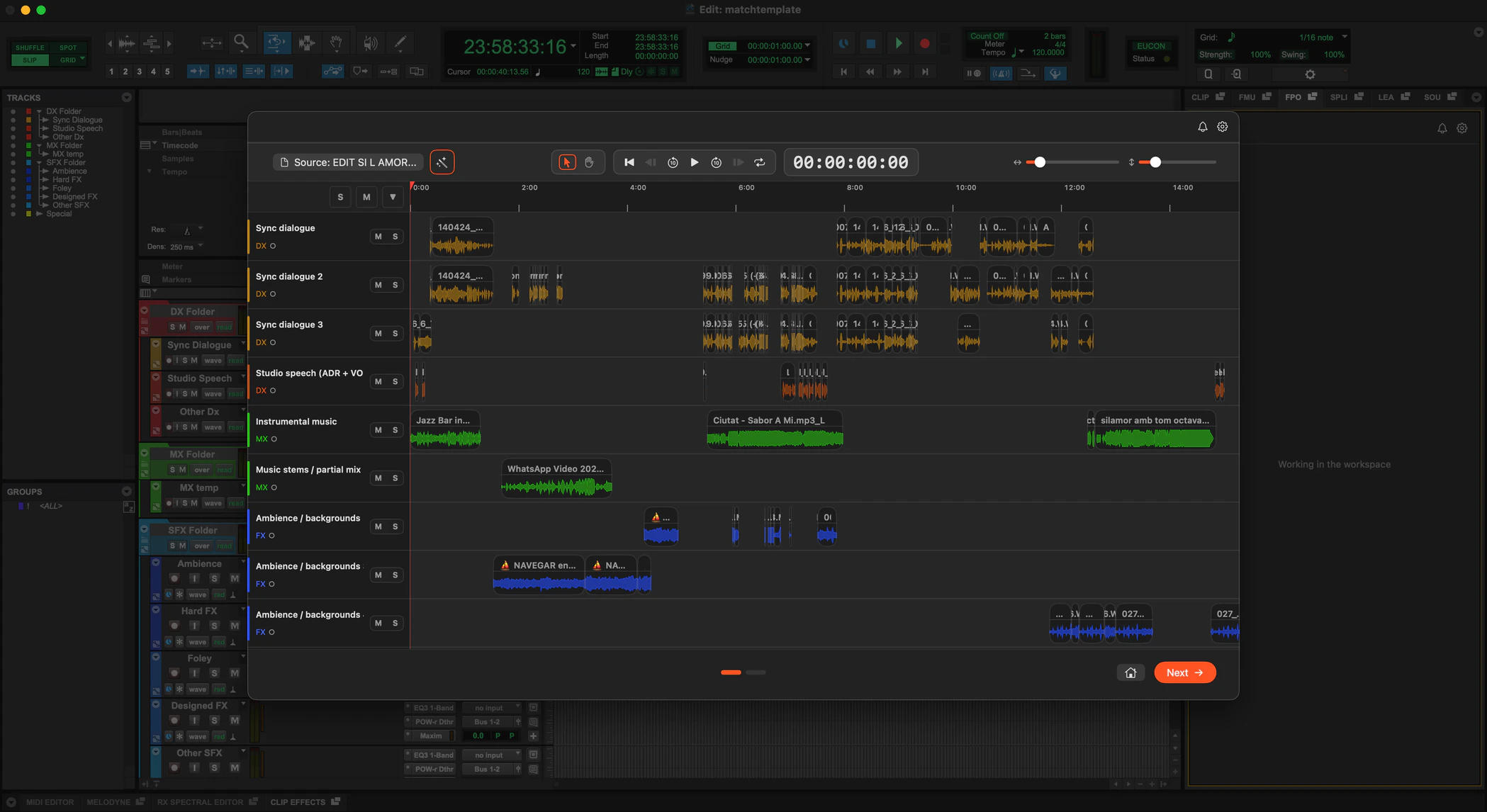
Drop the AAF, or a batch of them. Every clip is classified on device as dialogue, music or effects, down to ADR, walla and ambience, then placed at its exact source timecode on copies of your own template tracks, routing, plugins and sends included.
Step 2 · Organize any PTX
The session you already have, to the same standard.
Point fPost at the session you have open: it reclassifies every track, matches it to your template and colors it in one step, without importing anything new. Review it in the Visualizer, then apply.
Step 3 · Split by editor
One turnover in. A session per editor out.
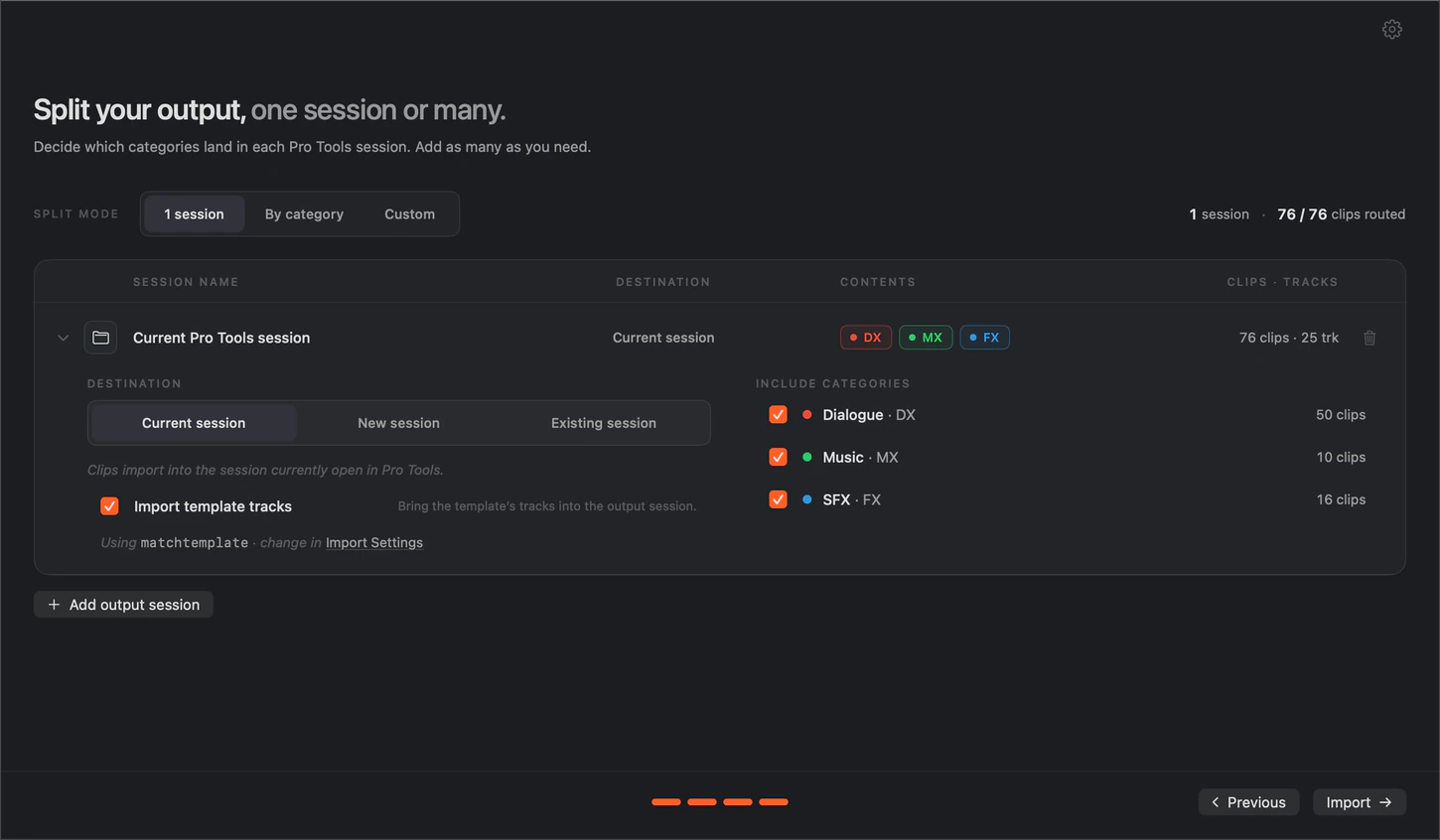
On Suite, split the turnover into separate DX, MX and SFX sessions, each named and routed to your template, so your editors work in parallel.
Install it in three steps.
The fPost Extension installs like any Pro Tools Extension. Get it from Avid or from us: it is the same installer.
- Step 1
Find it in Pro Tools
Open the Extensions panel in Pro Tools 2026.11, or pick Extensions from the Mac menu bar. It is listed there as fPost Extension.
- Pro Tools 2026.11 or later
- fMusic and fPost are separate Extensions
- Also listed on Avid.com
- Step 2
Download the installer
Download the same installer from Avid’s Extensions page or our download page. Pro Tools links you to Avid’s page.
- Same installer from Avid or from us
- macOS 13.5 or later
- Everything runs on your Mac
- Step 3
Install and start free
Run the installer and fPost Extension appears in the Extensions panel. The first run starts a free 7-day trial with everything unlocked, as in the desktop app.
- No account needed to start
- Full window or side tab
- Already on fPost? Sign in, it is in your plan
Pricing
Pricing that pays for itself.
Already on fPost? The Extension is included in your plan. New to fPost? Start free for 7 days inside Pro Tools, everything unlocked.
Free to start · no account needed
- Monthly
€49/month
fPost Studio
- YearlySave 50%
€24/month
billed yearly as €288
- LifetimePay once
€1,199one-time
yours forever, every update included
In Studio and Suite
Studio
For independent editors and single rooms.
- 1 seat (included)
- AAF import from Media Composer, Premiere Pro, Resolve and Pro Tools (included)
- Clips, fades, gains, automation and timecode kept intact (included)
- AI-R recognition: dialogue, music and effects (included)
- Template matching and naming (included)
- Pro Tools session reorganization, existing PTX included (included)
- Visualizer: review everything before it reaches Pro Tools (included)
- Session-level metadata (included)
- Your original AAF and media are never modified (included)
- Standard support, 48h (included)
Suite only
Suite adds
For busy rooms and small facilities.
- Priority support, 24h (Suite only, not included)
- Import multiple AAFs into one session (Suite only, not included)
- Split one AAF into DX, MX and FX sessions (Suite only, not included)
- Micro categories: sync dialogue, instrumental music, foley (Suite only, not included)
- Per-clip metadata (Suite only, not included)
fPost Enterprise
Floating licenses, a license server (LLS), an SLA and volume pricing for facilities and studios at scale.
Students and educators: apply for an educational deal
What our partners say

“fMusic took session prep off my plate after years of writing my own scripts. Inside Pro Tools it’s even better: I import, organize and print stems from the same window I mix in, without leaving the session. I hope it becomes the standard way of working in Pro Tools.”

Frequently asked questions
Have a question about the fPost Extension? These are the ones we hear most. If yours is missing, get in touch.
What does the fPost Extension do inside Pro Tools?
The fPost Extension turns an AAF turnover into a mix-ready Pro Tools session, cutting hours of manual prep to seconds, and reorganizes any existing session to the same standard. On-device AI classifies every clip as dialogue, music or effects, down to subcategories like ADR, walla and ambience, then lands each one at its exact source timecode on copies of your own template tracks, routing, plugins and sends included.
Which plan do I need for the fPost Extension?
The same plans as fPost: Studio or Suite, monthly or yearly, a Lifetime license, or Enterprise for facilities, at the same prices. The Extension and the desktop app are the same product, so one plan covers both: if you already pay for fPost the Extension is yours, and a plan bought from the Extension unlocks the desktop app. Plans are on the pricing page.
Which video editors can the AAF come from?
fPost reads AAF files exported from Avid Media Composer, Pro Tools, Adobe Premiere Pro and DaVinci Resolve. Final Cut Pro does not export AAF directly, so it is the one handover fPost cannot take natively.
Can the fPost Extension import multiple AAFs and split sessions?
Yes. Import a whole batch of AAFs in one pass, or split a turnover into separate DX, MX and SFX sessions so your editors work in parallel. Multi-AAF import and the splitter run in the free trial and on Suite, the same rule as the app.
What is free in the fPost Extension after the trial?
The Visualizer is always free: drop any AAF or open any session and see how fPost would build it, as often as you like. You keep 2 imports or organizes a month without a plan; the limit is the final step, not the number of clips. AAF Checker stays free too.
What are the requirements for the fPost Extension?
Pro Tools 2026.11 or later on macOS 13.5 or later, with Pro Tools’ interface in English. Everything runs on your Mac; nothing is uploaded.
Try Forte.
- Pro Tools 2026.11+macOS 13.5+
- Free to start