


Mix prep and stems.
Now inside Pro Tools.
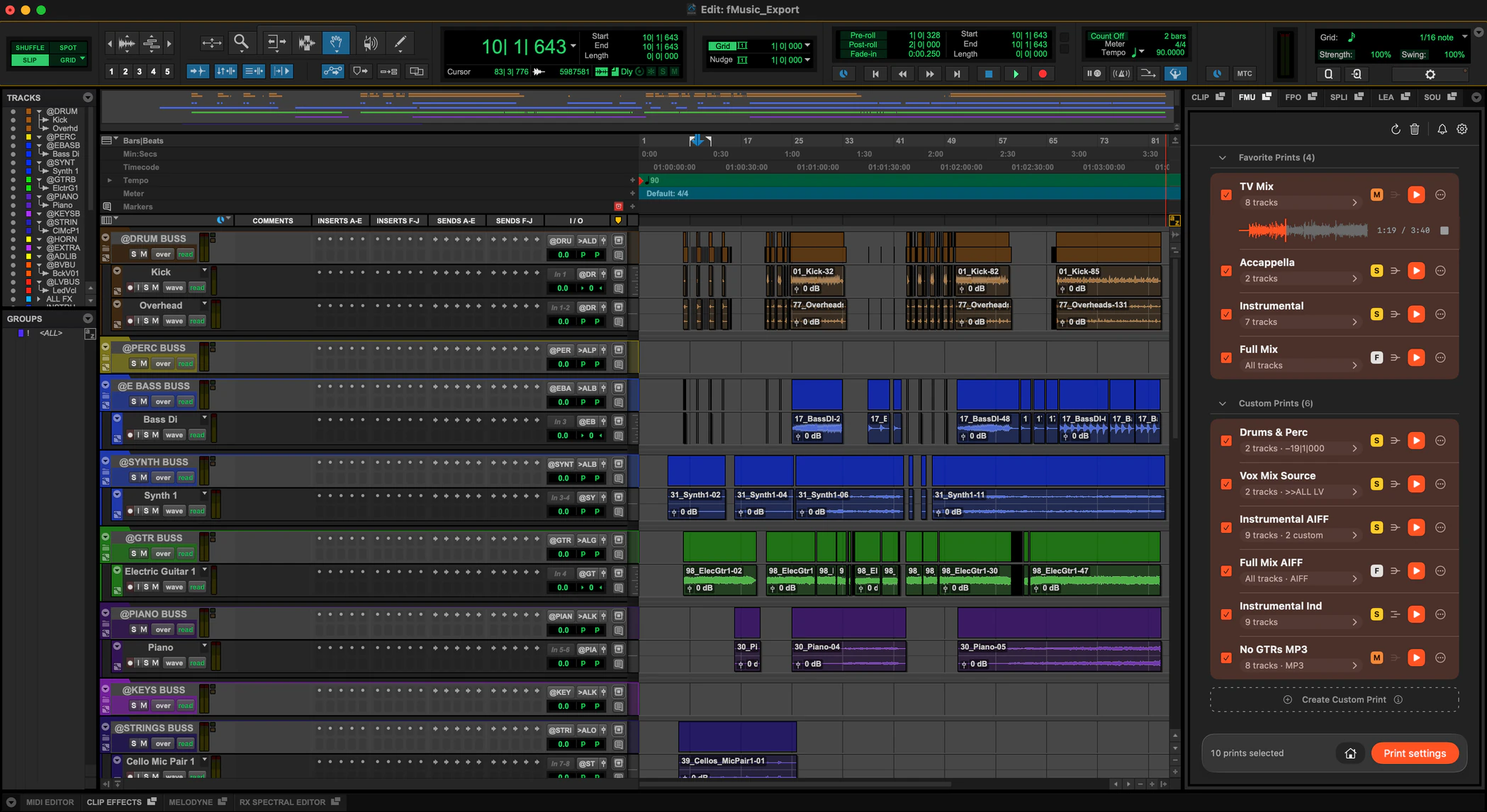
Mix prep on import, any session reorganized, every stem printed in one batch, from the Extensions panel. Included in every fMusic plan.
- Pro Tools 2026.11+macOS 13.5+
- Free to start
Prefer the desktop app? fMusic
Import. Organize. Export.
Step 1 · Import audio files
A folder of files in. A mix-ready session out.
Drop in stems or a whole folder: every track is recognized on device, named, colored, grouped and routed to your template, with fake stereo folded to mono, silence stripped per instrument category and levels gain staged to your target.
Step 2 · Organize any PTX
Any session, reorganized to your standard.
Point fMusic at the session you have open: it reads it track by track, recognizes what each one contains and reorganizes it, renamed, recolored, re-routed and reordered. A session from another room becomes yours in minutes. On Suite.
Step 3 · Export
Every stem and alt mix, in one batch.
Preview each print, pull it from routing source or routing folder, and bounce every stem and alternate mix in one pass, in every format you need, through Pro Tools’ own bounce engine.
Install it in three steps.
The fMusic Extension installs like any Pro Tools Extension. Get it from Avid or from us: it is the same installer.
- Step 1
Find it in Pro Tools
Open the Extensions panel in Pro Tools 2026.11, or pick Extensions from the Mac menu bar. It is listed there as fMusic Extension.
- Pro Tools 2026.11 or later
- fMusic and fPost are separate Extensions
- Also listed on Avid.com
- Step 2
Download the installer
Download the same installer from Avid’s Extensions page or our download page. Pro Tools links you to Avid’s page.
- Same installer from Avid or from us
- macOS 13.5 or later
- Everything runs on your Mac
- Step 3
Install and start free
Run the installer and fMusic Extension appears in the Extensions panel. The first run starts a free 7-day trial with everything unlocked, as in the desktop app.
- No account needed to start
- Full window or side tab
- Already on fMusic? Sign in, it is in your plan
What fMusic actually does, all day.
25,000+
sessions imported and organized
35,000+
stem and bounce exports delivered
30,000+hrs
of manual prep handed back
190a day
imports and exports at the current rate
Measured in fMusic over the last 12 months, as of July 2026. Hours saved is an estimate: 30 minutes of manual work per import and per export.
Pricing
Pricing that pays for itself.
Already on fMusic? The Extension is included in your plan. New to fMusic? Start free for 7 days inside Pro Tools, everything unlocked.
- Monthly
€18/month
fMusic Studio
- YearlySave 50%
€9/month
billed yearly as €108
- LifetimePay once
€499one-time
yours forever, every update included
In Studio and Suite
Studio
The complete fMusic workflow. Cancel any time.
- Built for Pro Tools (included)
- 2 seats (included)
- Import module: mix prep to your template (included)
- Export module: stems, prints and alt mixes (included)
- Multi-session batch processing (included)
- Free updates (included)
Suite only
Suite adds
Studio plus the professional modules.
- Organize module: any PTX reorganized to your setup (Suite only, not included)
- Match template and track preset modes (Suite only, not included)
- Audio normalization: target level, True Peak or RMS (Suite only, not included)
- Custom mix source, markers and formats per print (Suite only, not included)
- Stem categories from routing folders (Suite only, not included)
- Print preview with audition (Suite only, not included)
- Mixed queue: imports and exports in one batch (Suite only, not included)
Students and educators: apply for an educational deal
What our partners say

“fMusic took session prep off my plate after years of writing my own scripts. Inside Pro Tools it’s even better: I import, organize and print stems from the same window I mix in, without leaving the session. I hope it becomes the standard way of working in Pro Tools.”

Frequently asked questions
Have a question about the fMusic Extension? These are the ones we hear most. If yours is missing, get in touch.
What does the fMusic Extension do inside Pro Tools?
The fMusic Extension automates prep on import, reorganizing any session and stem delivery. Every track is recognized on device, named, colored, grouped and routed to your template, with fake stereo folded to mono, silence stripped per instrument category and levels gain staged to your target. Preview each print, then batch-bounce every stem and alt mix in every format.
Which plan do I need for the fMusic Extension?
The same plans as fMusic: Studio or Suite, monthly or yearly, or a Lifetime license, at the same prices. The Extension and the desktop app are the same product, so one plan covers both: if you already pay for fMusic the Extension is yours, and a plan bought from the Extension unlocks the desktop app. Plans are on the pricing page.
Does the fMusic Extension include Organize?
Yes, with the same rule as the app: Organize, the module that reorganizes any existing session to your standard, is part of Suite. In the free 7-day trial everything is unlocked, Organize included.
Can I bounce stems in batch from the Extension?
Yes. Every stem and alt mix prints in one batch, to your naming and in every format you configured, through Pro Tools’ own bounce engine. Multi-session batch runs in the trial and on a plan.
What is free in the fMusic Extension after the trial?
The Visualizer is always free, and you keep 2 imports or organizes and 2 exports a month without a plan. The limit is the final step, not the number of tracks or prints, so a run started by mistake does not use up the chance to test.
What are the requirements for the fMusic Extension?
Pro Tools 2026.11 or later on macOS 13.5 or later, with Pro Tools’ interface in English. Everything runs on your Mac; nothing is uploaded.
Try Forte.
- Pro Tools 2026.11+macOS 13.5+